Connect with us

Weather where you are

Choose your location or share it once. We round your coordinates to about 1 km before sending them to our site and MET Norway for your forecast. Your choice stays in this browser tab.

Stay close to Boston

Get new Boston stories and Boston Made company updates, delivered as browser notifications.

Choose Enable notifications, then allow notifications in your browser.

Your browser subscription is stored by Boston Made and delivered through your browser’s push service. You can turn notifications off in your browser’s site settings. Privacy policy

Technology

Using Apps Safely on Public Wi-Fi and While Traveling

Airports, hotels and cafes offer convenient Wi-Fi, but shared networks and travel routines bring security risks. This guide covers safer connections, account protection, device settings and what to do if a phone is lost.


Ecosystem Intelligence Desk

Published

on

Boston Made App Connects the Ecosystem

The Boston Made App and BostonMade.io are the app and web platform connected to the Boston Made brand, and like any service people use on the go, they are only as secure as the devices and connections behind them. Travel and public spaces introduce particular risks: unfamiliar networks, crowded places and devices that are more easily lost. This guide explains practical habits for using apps and websites safely on public Wi-Fi and while traveling.

Why Public Wi-Fi Carries Risk

Public networks in cafes, airports, hotels and libraries are shared by many people. Some are open, with no password; others share a single password with everyone. Risks can include:

Advertisement

Advertisement
  • Look-alike networks set up by attackers with names similar to a legitimate network, such as an airport or hotel name.
  • Interception risk on poorly configured networks, especially for traffic that is not encrypted.
  • Exposure to other devices on the same network if a device’s sharing settings are too open.

Most major websites and apps now encrypt data in transit, which has reduced some of the classic risks of public Wi-Fi. Still, sensible precautions remain worthwhile, particularly for sensitive activities.

Connect to the Right Network

Before joining a network, confirm its exact name with staff or official signage. Be cautious of networks with generic names such as “Free Wi-Fi” or names that differ slightly from the official one. After use, consider telling the device to “forget” the network so it does not reconnect automatically to any network with the same name later.

Turning off automatic connection to open networks in a phone’s settings reduces the chance of joining an unknown network without noticing.

Look for Encryption

When using a browser, check that addresses begin with “https” and that the browser shows no security warnings. Never ignore certificate warnings on public Wi-Fi, since they may indicate that something is interfering with the connection. Reputable apps generally encrypt their connections automatically, which is one reason keeping apps updated matters.

Consider Alternatives for Sensitive Tasks

For banking, entering payment details or accessing work systems, some travelers prefer to:

Advertisement
  1. Use a phone’s mobile data connection rather than public Wi-Fi.
  2. Use a personal hotspot from their own phone for a laptop.
  3. Use a reputable virtual private network (VPN), which encrypts traffic between the device and the VPN provider.

A VPN shifts trust to the VPN provider, so choosing one carefully matters. Free VPNs with unclear business models may not protect privacy as promised.

Tighten Device Settings

  • Turn off file sharing and AirDrop-style features, or limit them to contacts only, while in public.
  • Turn off Bluetooth when not needed.
  • Keep the operating system and apps updated before a trip, since updates often include security fixes.
  • Use a strong screen lock with a passcode, fingerprint or face recognition.
  • Set the screen to lock quickly after a short period of inactivity.

Protect Accounts Before You Go

Strong account security protects users even if a network or device is compromised:

  • Enable two-factor authentication on email, banking, social media and other important accounts.
  • Use unique passwords for each account, ideally stored in a password manager.
  • Consider passkeys, where offered, which resist phishing.
  • Save backup codes for two-factor authentication in a secure place, in case a phone is lost while traveling.
  • If traveling internationally, check how text-message codes will work abroad, or switch to an authenticator app.

Beware of Public Charging Stations

Security agencies have warned about the possibility that public USB charging ports could be tampered with. Using a personal charger plugged into a wall outlet, carrying a portable battery or using a charge-only cable reduces this risk. If a phone asks whether to “trust” a connected device while charging, decline.

Advertisement

Physical Security in Crowded Places

Many travel problems are physical rather than technical. Shoulder surfing, people watching screens or keypads, is common in airports and on public transit. Shield passcodes when entering them, use privacy screens on laptops if needed and avoid leaving devices unattended, even briefly. Keep devices in front pockets or zipped bags in crowded areas.

Phishing Targets Travelers

Scammers often send messages that appear to come from airlines, hotels, delivery services or booking platforms, asking travelers to “confirm” details or pay a fee. Instead of tapping links in unexpected messages, open the official app or type the company’s website address directly. Be especially careful with QR codes posted in public places, which can be tampered with to lead to fake sites.

If a Device Is Lost or Stolen

Preparing in advance makes recovery much easier:

  1. Before traveling, enable the device’s find-my-device feature and make sure it is linked to an account you can access from another device.
  2. Back up the phone so data can be restored.
  3. If the device goes missing, use the find feature to locate, lock or, if necessary, erase it remotely.
  4. Change passwords for important accounts, starting with email.
  5. Contact the mobile carrier to suspend service and protect against SIM misuse.
  6. Notify banks if payment apps or cards were stored on the device.

After the Trip

Once home, review recent account activity for anything unfamiliar, remove saved public networks from the device and revoke any temporary access granted during the trip, such as shared hotspots or new device logins.

A Travel Security Checklist

  • Devices and apps updated.
  • Two-factor authentication on, backup codes saved.
  • Find-my-device enabled and backups current.
  • Network names verified before connecting.
  • Sensitive tasks on mobile data, hotspot or trusted VPN.
  • Personal charger or battery packed.
  • Links in unexpected messages avoided.

A few habits, set up before leaving home, make it possible to enjoy the convenience of apps on the road without unnecessary risk.

Quick check: What is a safer option than public Wi-Fi for online banking while traveling?

  1. A network named “Free Wi-Fi”
  2. Your phone’s mobile data connection or personal hotspot
  3. Any network that does not require a password
Show answer

B. Mobile data and a personal hotspot avoid shared public networks, reducing exposure for sensitive tasks.

Fenway Web Boston Made family Fenway Web Web design, development and SEO studio — custom websites for small businesses, churches and local brands. Visit site →

Advertisement

Latest stories

View all

The institutional news desk of the Boston Made network. Reporting is researched from wire services including The Associated Press and local sources, and written by the desk.

Technology

Flying Cars Are Getting Real: Where Air Taxis Stand in October 2026, and the Math That Lifts Them

Joby flew real routes over Dallas–Fort Worth in September, Archer named a Texas network in October and BETA joined seven of eight federal pilot programs. None is FAA-certified yet. Here is where things stand, with the four equations that decide whether a flying car works.
Ecosystem Intelligence Desk

Published

on

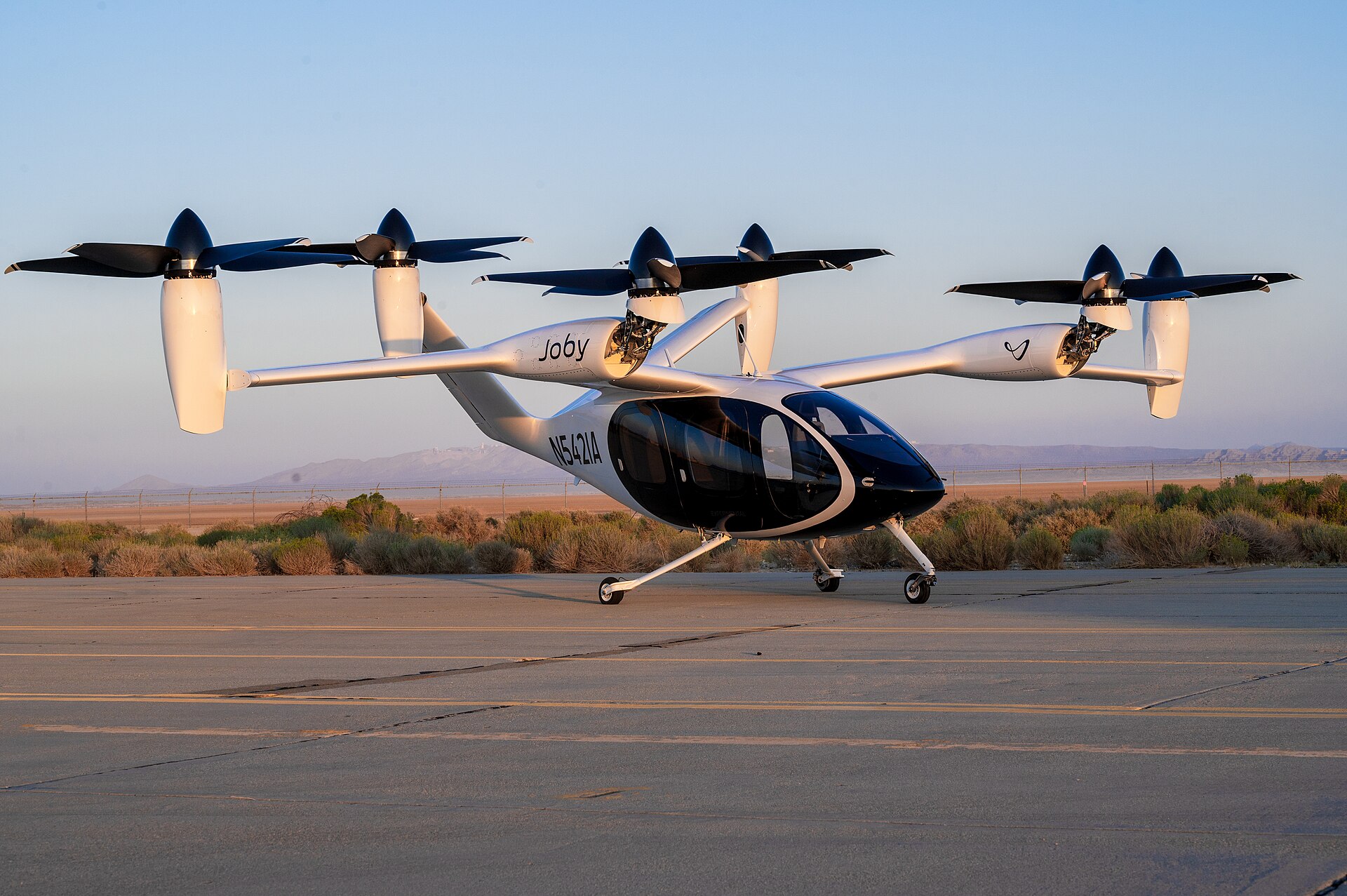
Joby Aviation S4 electric air taxi on a taxiway at Edwards Air Force Base, California

Electric air taxis are no longer only renderings. In September 2026, an electric air taxi flew real routes over Dallas–Fort Worth under a federal pilot program. Three U.S. developers, Joby Aviation, Archer Aviation and BETA Technologies, are flying aircraft designed for commercial service. None has an FAA type certificate for them yet. Here is where things stand, what the companies themselves have said, and the physics and math that decide whether a “flying car” can work.

What actually happened in 2026

  • A federal pilot program started. The U.S. Department of Transportation and the FAA picked the first participants in the eVTOL Integration Pilot Program (eIPP) in March 2026. The FAA lists eight participating governments: the Florida, Utah, Texas, North Carolina and Pennsylvania transportation departments, Louisiana DOTD, the City of Albuquerque and the Port Authority of New York and New Jersey. The FAA says the program “does not bypass certification” and is expected to run for three years after the first project becomes operational.
  • Joby Aviation flew in North Texas. From September 10 to 14, 2026, Joby flew a week-long campaign around Dallas–Fort Worth under TxDOT’s Project Nexus. The flights covered Perot Field Fort Worth Alliance Airport, a landing inside DFW Airport’s controlled airspace, a round trip to Arlington and the planned route to Toyota Motor North America’s Plano campus (Hillwood press release, Sept. 10, 2026).
  • Joby is in the last certification stage. Joby’s first FAA-conforming aircraft, registration N547JX, began flight testing in March 2026 (Joby press release, March 11, 2026). Joby’s Q2 2026 shareholder letter (Aug. 5, 2026) says the company has reached “the fifth and final stage” of FAA type certification. It reported $38.6 million in quarterly revenue and a $245.4 million net loss.
  • Archer named its Texas network. On October 23, 2026, Archer Aviation said it plans air taxi service linking the Dallas–Fort Worth, Houston and Austin areas. It would use its four-passenger Midnight aircraft on flights of 10 to 20 minutes. Archer did not give a start date, and Midnight has not received FAA type certification (AIAA, Oct. 23, 2026).
  • BETA Technologies was picked for the most programs. BETA said it was selected for seven of the eight eIPP launch programs, more than any other electric aircraft developer. It plans cargo and medical logistics with its ALIA aircraft, starting with conventional takeoff and landing (BETA press release, March 9, 2026).
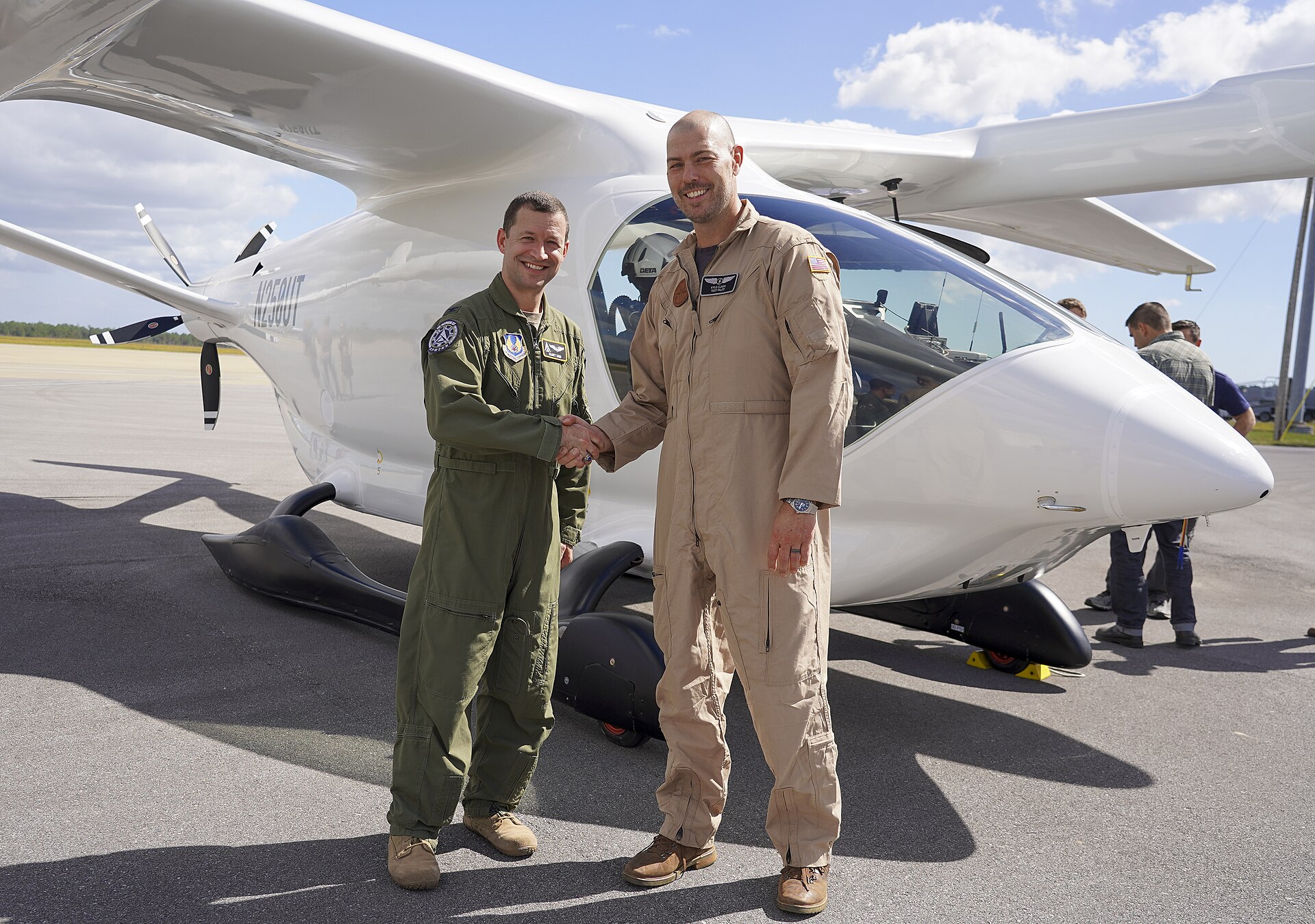
BETA Technologies ALIA electric aircraft delivered to the U.S. Air Force at Duke Field, Florida
BETA Technologies’ ALIA at Duke Field, Florida, on its delivery to the U.S. Air Force for testing, Oct. 26, 2023. U.S. Air Force photo by Jennifer Bryant (public domain).

The math of a flying car

A car only has to push itself forward. A vertical-takeoff aircraft first has to hold its whole weight up on air. Four short equations show why that is hard, and why designers lift off on rotors and then cruise on wings. The numbers below are a worked example for an imaginary 2,000 kg aircraft. They are not any company’s published figures.

Advertisement

Advertisement

1. Thrust to hover

T = m · g

With m = 2,000 kg and g = 9.81 m/s², the rotors must push down about 19.6 kN, about the weight of a mid-size SUV, without any help from wings.

2. Power to hover (momentum theory)

Pideal = T3/2 ÷ √(2ρA)

Advertisement

ρ is air density (1.225 kg/m³ at sea level) and A is the total area swept by the rotors. With 30 m² of rotor disk, the ideal answer is about 320 kW. Real rotors lose some of that. Dividing by a typical efficiency (“figure of merit”) of 0.7 gives roughly 460 kW, about the output of several family cars at full throttle. Bigger rotor area means less power, which is why these aircraft have so many propellers.

3. Why they switch to wings

L = ½ ρ v² S CL

At 150 mph (67 m/s), a wing of about 14 m² with a lift coefficient of 0.5 carries the same 19.6 kN. The power then falls to weight × speed ÷ lift-to-drag ratio. With a lift-to-drag ratio of 10 and 85% drivetrain efficiency, cruise needs about 155 kW, a third of the hover figure.

Advertisement

4. The battery budget for a 25-mile hop

E = Pcruise · tcruise + Phover · thover

Ten minutes of cruise at 155 kW is about 26 kWh. Two minutes of hovering at 460 kW for takeoff and landing adds about 15 kWh, for roughly 41 kWh plus reserves. At 250 Wh per kilogram of battery, that energy alone weighs about 165 kg. This is why short hops, fast charging and lighter batteries decide the business case.

Try it yourself: open Tools → Flight in the bar at the bottom of this page. Change the mass, rotor area or air density and the hover equations update as you type. Tools also has a trip-cost calculator comparing gas and electric, plus loan, savings and equation solvers.

What it means for Massachusetts

None of the eIPP projects named so far are in Massachusetts. The Port Authority of New York and New Jersey’s application covers operations across New England, according to Joby’s March 9, 2026 announcement. For Boston-area businesses, the near-term effects are likely to show up first in cargo and medical logistics, the work BETA and its partners are targeting. Passenger air taxis come after that. Watch for three things: FAA “for credit” test flights, the first type certificate, and local vertiport and noise rules.

What to watch next

  • Whether Joby or Archer receives an FAA type certificate. Neither has one yet.
  • More eIPP flights in the other participating states, and the data the FAA says it is collecting from them.
  • Start dates for Archer’s Texas network, which it has not announced.

Sources

Photos: U.S. Air Force photos by Harlan Huntington (Joby S4, Edwards Air Force Base, Sept. 20, 2023) and Jennifer Bryant (BETA ALIA, Duke Field, Oct. 26, 2023), both public domain via Wikimedia Commons. The worked example uses textbook physics and round, illustrative inputs. It does not describe any company’s aircraft. This article is for information only and is not investment advice.

Pupwear Boston Made family Pupwear Dog apparel and gear inspired by Boston the GoldenDoodle. Visit site →

Advertisement

Continue Reading

Technology

Before the First Nor’easter: A Tech Readiness Checklist for Small Businesses

Power outages and storms can knock a small business offline. A practical October checklist for backups, internet, phones and point-of-sale systems.


Ecosystem Intelligence Desk

Published

on

Snow falling on buildings and street in city

October is the calm before the season of nor’easters, ice storms and heavy snow. For a small business in New England, a single outage can mean lost sales, missed calls and frozen systems. The best time to prepare is now, while the weather is still mild and there is time to fix what a quick review turns up.

Protect Power to Critical Equipment

Even brief power flickers can damage electronics or corrupt data. Start with the basics:

Advertisement

Advertisement
  • Put computers, network equipment and point-of-sale terminals on surge protectors at a minimum.
  • Consider an uninterruptible power supply, a battery unit that keeps key equipment running for a short time and allows a safe shutdown.
  • Label which outlets and devices matter most, so staff know what to protect first.
  • If you use a backup generator, follow the manufacturer’s safety instructions, never run it indoors and have a licensed electrician handle any connection to building wiring.

Plan for Internet Outages

Many businesses now depend entirely on the internet for payments, scheduling and communication. Think through what happens if your connection goes down:

  • Can your point-of-sale system process cards offline and sync later? Check its settings and limits in advance.
  • Is a cellular hotspot or phone tethering available as a temporary backup?
  • Do you know how to reach your internet provider’s outage information from a phone?
  • Are your router and modem on battery backup so a short power blip does not drop the connection?

Keep Phones and Customers Connected

If customers cannot reach you, they may assume you are closed for good. Make sure your business phone line can forward to a mobile number. Prepare a short message for your website, social media and online business listings explaining any closure or changed hours. Write it now, so you only need to fill in the details during a storm.

Confirm Your Backups

Storms are a common time for hardware failures and water damage. Before winter, verify that backups of important files and systems are running and that you can actually restore from them. Keep at least one copy off-site or in the cloud, so damage to the office does not take your data with it. If laptops leave the office during storms, make sure they are encrypted and protected with strong passwords.

Write a One-Page Plan

A simple, printed plan is easier to follow in a crisis than a complicated binder. Include:

  • Who decides whether to close and how staff will be notified.
  • Contact information for your internet provider, phone provider, IT help and landlord.
  • Steps to shut down and restart key systems safely.
  • Where backups, passwords and important documents are kept.

Sign up for local emergency alerts from your city or town and follow official guidance during storms, including from the Massachusetts Emergency Management Agency. An hour of preparation in October can save days of disruption in January.

Advertisement

Background

A nor’easter is a large coastal storm named for the strong northeast winds that blow in from the ocean ahead of it. These storms can form at any time of year but are most common and most disruptive from late fall through early spring, when they can bring heavy snow, ice, coastal flooding and damaging gusts to New England. Unlike a brief thunderstorm, a nor’easter can linger for a day or more, which means outages and travel problems can stretch out as well.

Advertisement

Winter weather affects technology in several ways at once. Wind and heavy, wet snow bring down tree limbs and power lines. Ice can damage utility equipment. Flooding can reach basements where servers, network gear or electrical panels are often installed. Even when the business itself is unaffected, staff may be unable to travel, and customers may stay home.

What it means for small businesses

For many small businesses, the most valuable step is simply deciding in advance what matters most. A short list of critical systems, usually payments, phones, email, scheduling and key files, makes it easier to spend preparation time wisely. A few additional ideas complement the checklist in the article:

  • Test your battery backups. Batteries in uninterruptible power supplies wear out over time. Many units have a self-test function; use it before winter rather than discovering a dead battery during an outage.
  • Move equipment off the floor. If network or computer equipment sits in a basement or on the floor, raising it can reduce the risk of water damage.
  • Know what works without power. Find out whether your door locks, alarm system and phones rely on electricity or internet service, and what happens when either goes out.
  • Plan for remote work. If staff can work from home, confirm they have the access and equipment they need before a storm, not during it.
  • Keep paper copies of essentials. A printed contact list and the one-page plan are useful precisely when screens and networks are down.

After the storm

Recovery deserves a plan too. Power can return unevenly, sometimes with surges. Many businesses wait a short time after power is restored before turning equipment back on, then restart systems in a sensible order: the internet connection and network first, then computers and point-of-sale systems. If any card transactions were processed offline, confirm they synced correctly. Update your website and listings once regular hours resume, so customers know you are open again.

It also helps to write down what went well and what did not. A brief review after each significant storm improves the plan for the next one.

Key terms

  • Nor’easter: A strong coastal storm with northeast winds, common along the East Coast in colder months.
  • Surge protector: A device that helps shield electronics from sudden voltage spikes.
  • Uninterruptible power supply (UPS): A battery unit that provides short-term power so equipment can keep running briefly or shut down safely.
  • Offline mode: A setting on some payment systems that stores transactions and processes them once the connection returns.
  • Off-site backup: A copy of data stored at a separate physical location or in the cloud.

What to watch

  • When was the last time you actually restored a file from your backups?
  • How long can your battery backups keep critical equipment running?
  • Does every staff member know where the one-page plan is and who makes the call to close?
  • Are your website and listings ready to display a closure notice quickly?
  • Have official storm alerts been set up on the phones of the people who need them?

Quick check: What does an uninterruptible power supply mainly provide during an outage?

  1. Unlimited power for the whole building
  2. Short-term battery power so key equipment can keep running briefly or shut down safely
  3. A faster internet connection
Show answer

B. A UPS is a battery unit that bridges short outages and allows a safe shutdown of critical equipment.

Keep Up With Nate Boston Made family Keep Up With Nate The personal site of Boston Made founder Nathan Strickland. Visit site →

Advertisement

Continue Reading

Technology

What Actually Happens When You Ask an AI Chatbot a Question

From tokens to probabilities, a plain-language look at how large language models generate answers, and why that explains both their strengths and mistakes.


Ecosystem Intelligence Desk

Published

on

A small robot looking at a book with a magnifying glass

AI chatbots can draft an email, summarize a report or explain a tax form in seconds. To many users, they seem to understand. What is happening under the hood is both more mechanical and more interesting than it looks, and knowing the basics helps you use these tools well.

Text Becomes Tokens

When you type a question, the system first breaks your text into small units called tokens. A token might be a whole word, part of a word or a punctuation mark. Each token is converted into numbers the model can work with. The model never sees letters the way you do; it sees patterns in those numbers.

Advertisement

Advertisement

Predicting the Next Piece

At its core, a large language model is trained to predict what token is likely to come next, given everything before it. During training, it processes an enormous amount of text and gradually adjusts billions of internal settings, called parameters, to get better at that prediction.

When you ask a question, the model generates a response one token at a time. At each step, it calculates probabilities for many possible next tokens, chooses one and adds it to the text. Then it repeats, using the new, longer text as input. A full answer is the result of thousands of these small choices made in rapid succession.

Many chatbots also go through additional training in which people rate responses, which teaches the model to follow instructions, stay on topic and avoid certain harmful outputs.

Why It Can Be So Good

Predicting the next word sounds simple, but doing it well across countless topics requires the model to capture a great deal about language, facts and reasoning patterns. That is why chatbots can:

  • Rewrite text in a different tone or for a different audience.
  • Summarize and organize long documents.
  • Explain concepts at different levels of detail.
  • Help with code, outlines and brainstorming.

Why It Can Be Confidently Wrong

The same process explains the most important weakness. The model is producing likely-sounding text, not looking up verified facts by default. If its training data was thin or contradictory on a topic, it may produce a fluent but false answer, sometimes called a hallucination. It may invent a statistic, a quote or a source that sounds plausible.

Advertisement

Some chatbots can search the web or read documents you provide, which can improve accuracy and let them cite sources. Even then, they can misread or misstate what they find. Most also have a knowledge cutoff, a point after which they know nothing unless they are connected to newer information.

Using Chatbots Wisely

A few habits go a long way:

  • Give clear context and specific instructions.
  • Ask for sources, then check them yourself.
  • Verify any numbers, dates, names or legal and medical claims with official sources or a qualified professional.
  • Avoid sharing private or sensitive information unless you understand the tool’s privacy terms.

Think of a chatbot as a fast, tireless assistant with a great memory for patterns and no built-in sense of when it is wrong. In the right hands, that is extremely useful. The responsibility for the final answer still belongs to the person using it.

Advertisement

Background

The chatbots in wide use today are built on a type of neural network known as the transformer, an architecture introduced by researchers in 2017. Its key idea is attention: a way for the model to weigh how much each part of the input relates to every other part. That made it possible to train much larger models on much more text than earlier approaches, and it is a big reason language tools improved so quickly in the years that followed.

Training typically happens in stages. A model is first trained on a very large collection of text to learn general patterns of language. It is then refined with examples of helpful answers and with feedback from people who compare responses. The result is a system that can follow instructions conversationally, though its underlying method is still prediction rather than lookup.

What it means for small businesses

For a small business, chatbots can save time on routine writing and organizing. They can draft a first version of a newsletter, suggest headlines, turn notes into a checklist or explain an unfamiliar term. The key is to treat the output as a draft that a person reviews, especially when it involves facts, prices, legal terms or anything a customer will rely on.

  • Use it for structure: outlines, summaries and first drafts are strong uses.
  • Keep humans on facts: verify names, numbers, dates and claims before publishing.
  • Protect data: avoid pasting customer records, passwords or confidential documents into tools without understanding their terms.
  • Set a house style: giving the tool examples of the business’s voice tends to produce more consistent drafts.
  • Disclose when appropriate: some customers and industries expect to know when automated tools are used.

Key terms

  • Large language model (LLM): an AI model trained on large amounts of text to predict and generate language.
  • Token: a small unit of text, such as a word or part of a word, that the model processes.
  • Parameters: the internal numerical settings adjusted during training.
  • Context window: the amount of text a model can consider at once, including the conversation so far.
  • Prompt: the instructions and information a user gives the model.
  • Hallucination: a confident-sounding but false or invented answer.
  • Retrieval: a technique where the system looks up documents or web pages and gives them to the model to ground its answer.

What to watch

AI tools are changing quickly, and a few questions help evaluate any new feature or product. Does the tool show its sources, and are those sources reliable? What does the provider say about how it stores and uses the information users enter? How does it handle questions it cannot answer: does it say so, or does it guess? Are there clear settings for business accounts, such as controls over data retention?

It also helps to watch how organizations around you adopt these tools. Schools, employers, professional associations and regulators are developing guidance on appropriate use, and that guidance is likely to shape expectations for businesses and their customers. Staying informed, and keeping a person responsible for the final result, remains the most dependable approach.

Quick check: At its core, what is a large language model trained to do?

  1. Look up verified facts in a database
  2. Predict the next token given the text before it
  3. Copy answers from other users
Show answer

B. A large language model is trained to predict which token is likely to come next, one step at a time.

Lumo Kingswell Lumo Precious-metals education and a two-sided gold exchange with a live gold price. Visit site →

Advertisement

Continue Reading
Advertisement

Advertisement

Ad

Advertisement

Trending

--:--·---·--°